Back to blog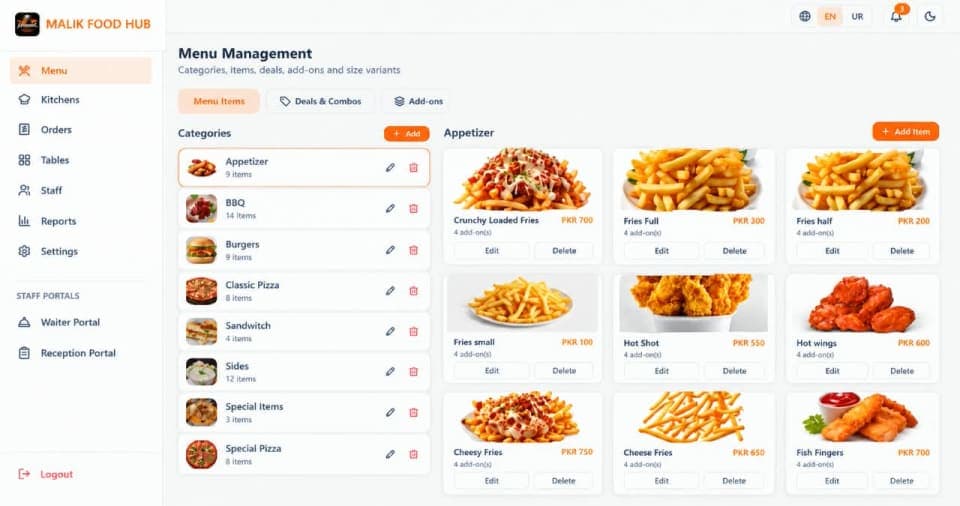
September 10, 2026RMS Team
Restaurant Menu Management: Manage Your Menu Better
Managing a restaurant menu can become difficult as you add more items, categories, prices, and add-ons. Digital menu management helps keep everything organized and up to date.
A restaurant menu is more than a list of food items. It is one of the main things customers interact with when deciding what they want to order.
Managing a larger menu can become difficult when you have more items, categories, and prices to keep updated.
1. Keep Your Restaurant Menu Organized:
An organized menu helps customers find what they are looking for easily.
Restaurants can organize menu items into categories such as:
Starters
Main Course
Burgers
Pizza
Desserts
Beverages
This makes the menu easier for customers to browse and staff to manage.
2. Add and Remove Menu Items:
New menu items, including dishes, drinks, and seasonal specialties, can be added to the menu. Discontinued or temporarily unavailable items can also be removed, so customers are not offered food that is not available.
3. Update Menu Information:
Prices, ingredients, and other menu details can change over time. Updating them digitally makes it easier for staff to keep the menu accurate without changing a physical menu every time.
4. Manage Menu Add-ons:
Many customers like to customize their food with add-ons such as cheese, toppings, extra sauce, or an extra serving of a particular ingredient. Adding these options to specific menu items makes it easier for customers to customize their orders and helps staff manage them correctly.
5. Keep Ordering Simple:
When the menu is connected to the ordering process, customers can select items and add-ons directly when placing an order. This helps keep orders consistent between the front of house, kitchen, and billing.
Managing a larger menu can become difficult when you have more items, categories, and prices to keep updated.
1. Keep Your Restaurant Menu Organized:
An organized menu helps customers find what they are looking for easily.
Restaurants can organize menu items into categories such as:
Starters
Main Course
Burgers
Pizza
Desserts
Beverages
This makes the menu easier for customers to browse and staff to manage.
2. Add and Remove Menu Items:
New menu items, including dishes, drinks, and seasonal specialties, can be added to the menu. Discontinued or temporarily unavailable items can also be removed, so customers are not offered food that is not available.
3. Update Menu Information:
Prices, ingredients, and other menu details can change over time. Updating them digitally makes it easier for staff to keep the menu accurate without changing a physical menu every time.
4. Manage Menu Add-ons:
Many customers like to customize their food with add-ons such as cheese, toppings, extra sauce, or an extra serving of a particular ingredient. Adding these options to specific menu items makes it easier for customers to customize their orders and helps staff manage them correctly.
5. Keep Ordering Simple:
When the menu is connected to the ordering process, customers can select items and add-ons directly when placing an order. This helps keep orders consistent between the front of house, kitchen, and billing.
Restaurant Menu ManagementMenu ManagementDigital MenuMenu Add-ons